


Visual Schedule: Autism’s Secret Weapon to Managing Time and Boosting Efficiency
A visual schedule for children with autism serves as a secret weapon to help with time management and staying organized.
Visual schedules, which are visual representations of tasks or activities in a daily routine, provide structure and clarity, helping to reduce anxiety and stress while promoting independence.
Research has shown that visual schedules improve time management, enhance understanding of transitions, and encourage independence in individuals with autism.
Furthermore, they can be easily customized to fit the unique needs and preferences of each person, making them highly adaptable for various situations and environments.
Overall, visual schedules are a powerful tool that can significantly improve the lives of individuals with autism, helping them navigate their daily routines with greater efficiency and ease.

What are visual schedules
Visual schedules are visual representations of tasks or activities in a daily routine.
They can take various forms, from simple picture-based schedules to more advanced digital versions.
The main purpose of visual schedules is to provide structure and clarity, helping individuals with autism effectively manage their time and boost efficiency.
Whether it’s a simple picture-based schedule or a more advanced digital version, visual schedules offer a clear step-by-step guide to daily activities.
By breaking down tasks into manageable chunks and providing visual cues, these schedules not only aid in time management but also enhance comprehension and communication skills for individuals with autism.

The benefits of using visual schedules
Visual schedules are particularly beneficial for individuals with autism because they provide a visual cue that aids in comprehension and communication.
Many individuals with autism have difficulty processing and understanding spoken language, which can lead to confusion and frustration.
Visual schedules offer a visual representation of tasks and activities, making it easier for individuals with autism to understand and follow instructions.
In addition to promoting comprehension, visual schedules also help reduce anxiety and stress.
Individuals with autism often struggle with transitions and changes in routine, which can be overwhelming.
Visual schedules provide a sense of predictability and routine, helping to reduce anxiety and increase comfort.
Visual schedules can be customized to fit the unique needs and preferences of each individual.
Some individuals may prefer a simple picture-based schedule, while others may benefit from a more detailed and structured digital schedule.
The key is to find a format that works best for the individual and provides the necessary level of support.
Overall, visual schedules are a valuable tool in helping individuals with autism manage their time, stay organized, and navigate their daily routines with greater ease and efficiency.

Research and studies on the effectiveness of visual schedules
Research has shown that visual schedules offer numerous benefits for individuals with autism. Here are some of the key advantages:
1. Improved Time Management
Visual schedules help individuals with autism understand the concept of time and manage it effectively. By breaking down tasks into smaller, manageable steps, visual schedules make it easier for individuals to prioritize and complete tasks within a given timeframe.
2. Enhanced Understanding of Transitions
Transitions can be particularly challenging for individuals with autism, often leading to anxiety and meltdowns. Visual schedules provide a visual representation of the sequence of activities, making transitions more predictable and easier to understand. This reduces anxiety and helps individuals transition smoothly from one task to another.
3. Increased Independence
Visual schedules promote independence by providing individuals with autism the tools they need to navigate their daily routines on their own. Students refer to the schedule whenever they need guidance, reducing their reliance on others for instructions.
4. Improved Comprehension and Communication Skills
Many individuals with autism struggle with processing and understanding spoken language. Visual schedules offer a visual representation of tasks and activities, making it easier for individuals to comprehend and follow instructions.
5. Reduced Anxiety and Stress
Individuals with autism often experience high levels of anxiety and stress due to the unpredictability of daily routines. Visual schedules provide a sense of structure and routine, reducing anxiety and promoting a sense of calm.
Visual schedules offer a range of benefits for individuals with autism.
This includes improved time management, enhanced understanding of transitions, increased independence, improved comprehension and communication skills, and reduced anxiety and stress.
By providing structure, clarity, and predictability, visual schedules empower individuals with autism to navigate their daily routines with greater efficiency and ease.

How to Create a Visual Schedule
Visual schedules require a lot of initial set up but are well worth the time you invest.
Let’s get started on how to create a visual schedule for your classroom.
First, you will need a master schedule.
This should feature all of the students in the class as well as all of the adults.
Then, you need to pick the type of schedule you are using for each student.
Use the list below as a starting point for what visual schedule would best support which student.
Next, create or download the visual schedule template or templates you’ve selected.
Typically, you’ll need to print in color, laminate, cut out, and Velcro the pieces.
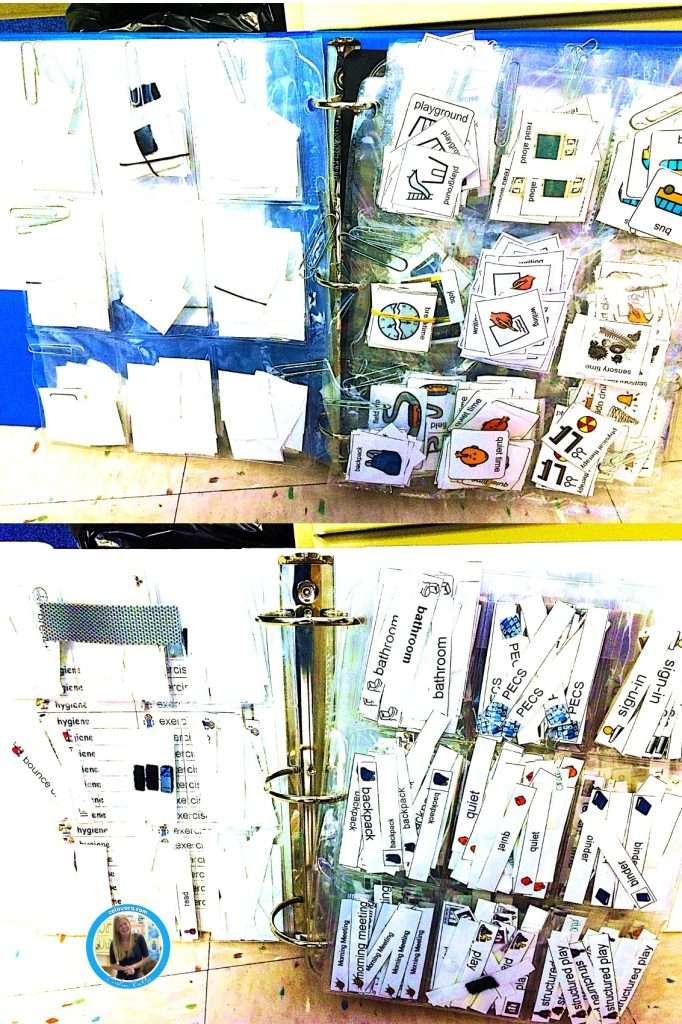
Then, decide how to organize your pieces.
I recommend using binders with baseball trading clear sleeves to file pieces into.
Also, have a tub of schedule pieces that need to be refiled so you can stay on top of organization.
Then either use clear packaging tape to secure the visual schedule grid onto the label or door or place it in a portable binder or clipboard.
Have each schedule set for the beginning of the day and reset the schedules after the students leave at the end of the day.
Overall, visual schedules are a powerful tool that can significantly improve the lives of individuals with autism, helping them navigate their daily routines with greater efficiency and ease.
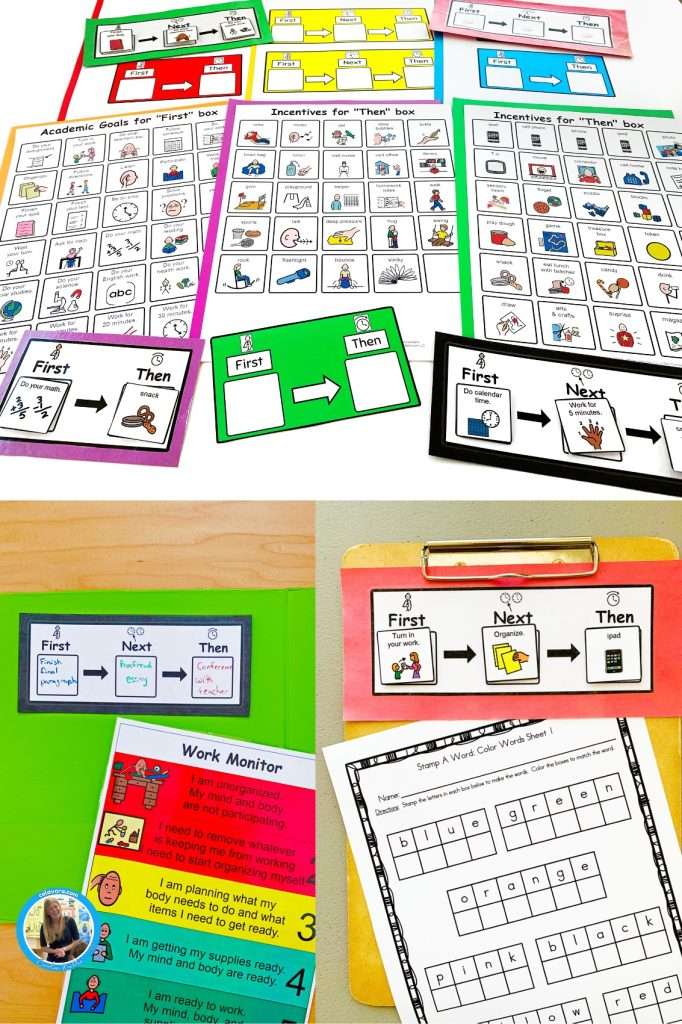
First, then boards
First, then boards are a type of visual schedule that provides a visual representation of tasks or activities in a sequential order.
The “first” part of the board shows the current activity or task, while the “then” part indicates the next activity or task that follows.
This visual cue helps individuals with autism understand what is expected of them and what will happen next.
One of the key benefits of using first, then boards is that they provide a clear and structured routine, which can be especially helpful for individuals who struggle with transitions.
By visually representing the sequence of activities, these boards reduce anxiety and increase predictability, making it easier for individuals with autism to navigate their daily routines.
To create a first, then board, use pictures or symbols to represent each activity or task.
It’s important to choose visuals that are meaningful and familiar to the individual.
For example, if the first activity is brushing teeth, use a picture of a toothbrush, and if the next activity is getting dressed, use a picture of clothes.
Using first, then boards can be particularly effective when combined with verbal instructions and positive reinforcement.
By providing clear expectations and rewards for completing tasks, individuals with autism are more likely to stay focused and motivated.
First, then boards should be introduced as a first visual schedule.
They should also be used if the student is struggling with schedules that are more complex.
This simple tool is a valuable way in to individuals with autism understand and navigate their daily routines.
By providing a visual representation of tasks and activities in a sequential order, these boards promote structure, reduce anxiety, and enhance predictability.
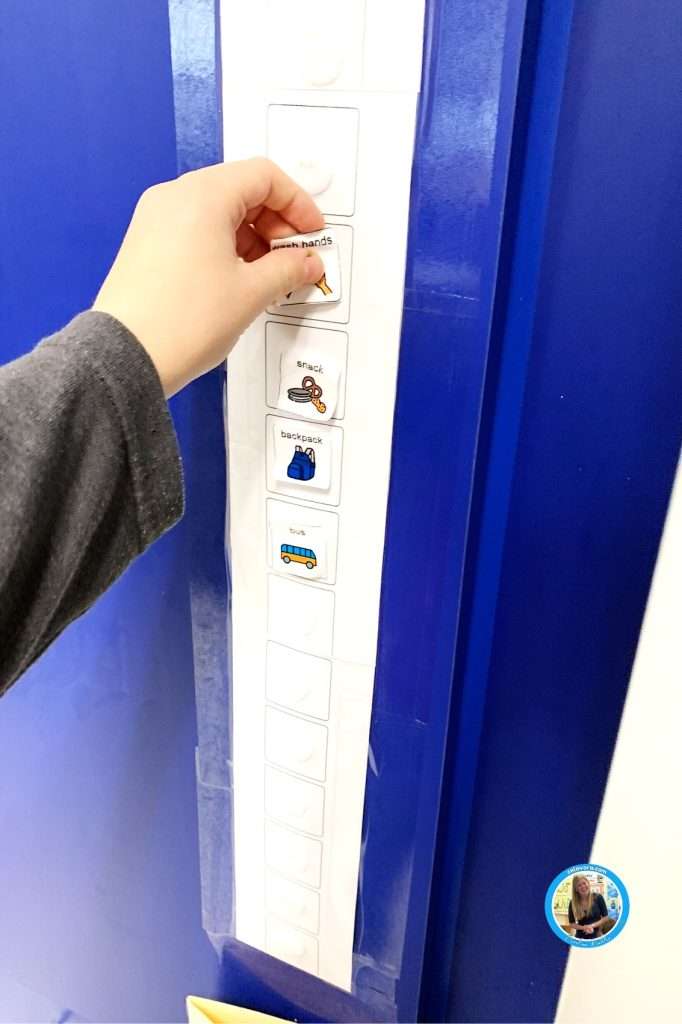
Printed visual schedule
Visual schedules can take various forms, depending on the needs and preferences of the individual.
Printed visual schedules are the most commonly seen.
They involve using pictures or symbols to represent each task or activity in a daily routine.
The visuals can be printed and arranged in sequential order on a board or a wall.
Alternatively, they can be placed in a binder or a notebook that the individual can carry with them.
To create a printed visual schedule, follow these steps:
1. Identify the tasks or activities that need to be included in the schedule.
2. Choose appropriate visuals that represent each task or activity. These visuals can be pictures, symbols, or even written words, depending on the individual’s preferences and abilities.
3. Choose a template to arrange the schedule pieces on. Place the visuals in a sequential order, starting with the first task or activity of the day. Always work from either top to bottom or left to right.
4. Display the schedule in a visible and accessible location, such as on a wall, a cubby door, or a desk.
If you have a student who struggles taking on picture off at a time, I highly recommend using a pull-flap schedule.
These visual schedules have a “door” that velcros on top of the activity.
Then, the student opens the door, reveals the activity, and goes to the task.
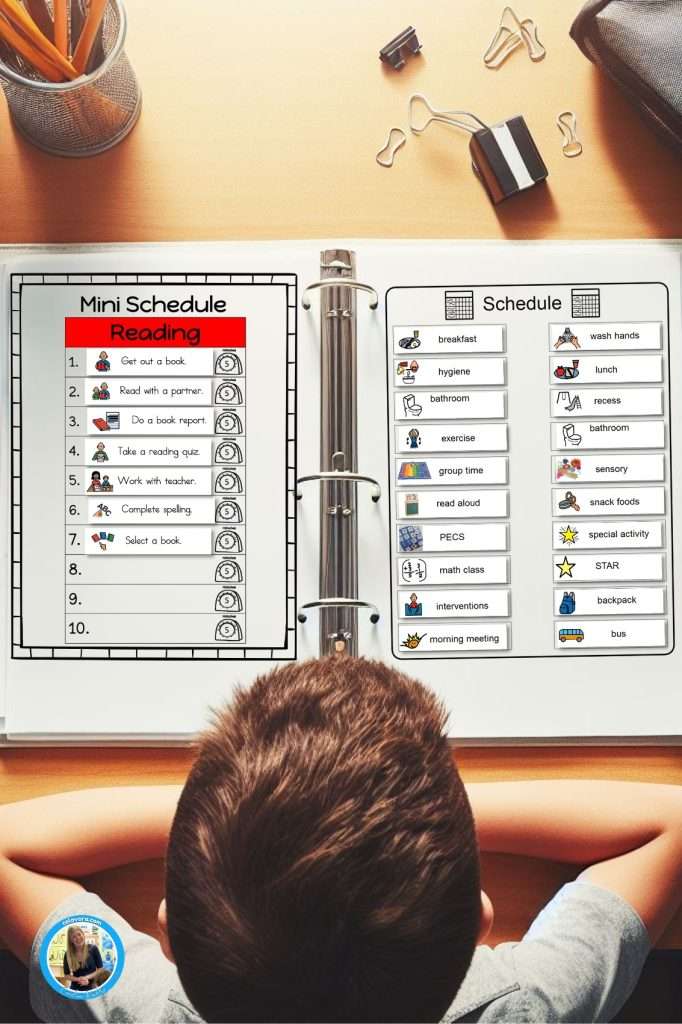
Mini visual schedule with checklists
A mini visual schedule with checklists is a portable and interactive version of a visual schedule.
Mini schedules are made with assorted task pictures that help students understand the individual steps within an activity.
Each visual represents a task or activity, and the individual can physically check off or remove the visual once the task is completed.
I like to use them on a clipboard for each organization and traveling.
To create a mini visual schedule with checklists, follow these steps:
1. Choose smaller visuals or pictures that can easily fit on a line of your mini schedule template.
2. Laminate the visuals for durability.
3. Cut out and attach velcro to each piece.
4. Review the schedule with the individual, explaining each task or activity and its corresponding visual.
5. Encourage the individual to physically check off or remove the visual once the task is completed.
Mini schedules can also be used digitally which can be faster and more productive.
As always, use whatever method works best for your student.

Digital Visual Schedule
Digital schedules are more advanced and customizable versions of visual schedules.
I typically create them first using Boardmaker.
Then I transfer the pictures into PowerPoint or Google Slides.
This makes them easy-to-use and functionable on Macs, PCs, Chromebooks, and iPads.
Digital visual schedules are great for the student who isn’t interested in printable visual schedules.
No more printing, laminating, cutting, Velcroing, physically resetting the schedule, or searching for lost pieces!
Digital visual schedules allow for greater flexibility and personalization but they are also great for kids who are drawn to technology.
Digital schedules can include pictures, symbols, text, and even audio or video prompts.
To create a digital schedule, follow these steps:
1. Create or choose a digital scheduling that meets the individual’s needs and preferences. I like to create in either PowerPoint or Google Slides.
2. Set up the schedule by inputting the tasks or activities and their corresponding visuals or prompts.
3. Customize the schedule by adjusting the settings, layout, and level of detail according to the individual’s preferences.
4. Review the schedule with the individual, explaining how to navigate and use the digital schedule.
5. Encourage the individual to use the digital schedule independently, providing support and guidance as needed.
My digital schedule templates work with only one activity up to 30 activities in one set.
While png format clip art pictures are included this set works well with photographs should you choose to use real photos from your classroom and school.
With a digital schedule, adjustments are made quickly and easily.
This ensures that students stay on track and maintain a sense of control over their daily lives.
Tips for using visual schedules effectively
For children with autism, managing time and staying organized can be especially challenging.
That’s where visual schedules come in, serving as a secret weapon to help these individuals effectively manage their time and boost efficiency.
Visual schedules, which are visual representations of tasks or activities in a daily routine, provide structure and clarity, helping to reduce anxiety and stress while promoting independence.
Whether it’s a simple picture-based schedule or a more advanced digital version, visual schedules offer a clear step-by-step guide to daily activities.
By breaking down tasks into manageable chunks and providing visual cues, these schedules not only aid in time management but also enhance comprehension and communication skills for individuals with autism.
Research has shown that visual schedules improve time management, enhance understanding of transitions, and encourage independence in individuals with autism.
Also, they can be easily customized to fit the unique needs and preferences of each person, making them highly adaptable for various situations and environments.
Overall, visual schedules are a powerful tool that can significantly improve the lives of individuals with autism, helping them navigate their daily routines with greater efficiency and ease.
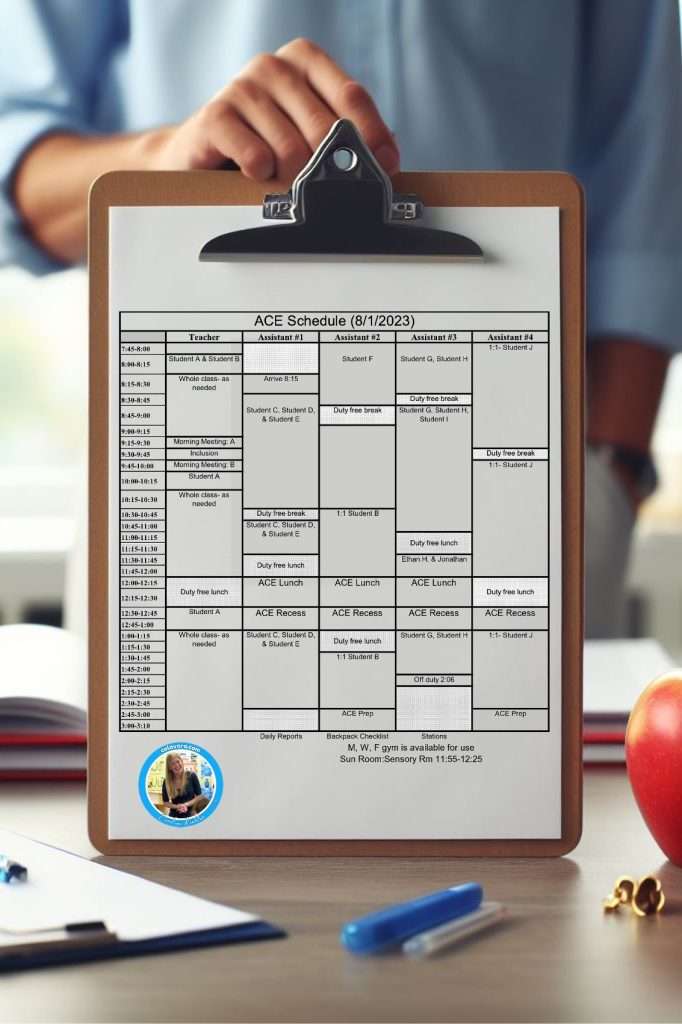
Success with a Visual Schedule
In conclusion, visual schedules are a powerful tool that can significantly improve the lives of individuals with autism.
By providing structure, clarity, and predictability, visual schedules help individuals manage their time effectively, navigate transitions with greater ease, and enhance overall efficiency.
Visual schedules offer numerous benefits, including improved time management, enhanced understanding of transitions, increased independence, improved comprehension and communication skills, and reduced anxiety and stress.
They can be easily customized to fit the unique needs and preferences of each individual, making them highly adaptable and versatile.
Research studies consistently support the effectiveness of visual schedules in improving various aspects of daily functioning for individuals with autism.
The positive outcomes demonstrate the value of incorporating visual schedules into the daily routines of individuals with autism.
Whether using first, then boards, printed visual schedules, mini visual schedules with checklists, or digital schedules, the key is to choose a format that works best for the individual and provides the necessary level of support.
By implementing visual schedules effectively and following best practices, individuals with autism can experience significant improvements in time management, comprehension, communication, and overall well-being.
A visual schedule truly is autism’s secret weapon to managing time and boosting efficiency, empowering individuals with autism to navigate their daily routines with confidence and success.


